
Copy the responder link
Open the form in its editor and use the publishing or responder-sharing controls. Labels can differ between accounts and interface versions. Do not copy an editing URL or give edit access to someone who only needs to complete the form.
Google Forms also offers a shortened-link option in its sharing workflow. That may be enough for basic sharing. Kitzr is useful when you want a custom alias or to manage opens alongside your other links.
Check access before shortening
Open the responder link in a private window or an account that does not own the form. If an organization sign-in is required, check whether that fits your audience. Review the form’s purpose before changing any access or email-collection settings.
A short URL does not publish an unpublished form or bypass a sign-in requirement. If the form is closed to responses, shortening will not reopen it.
Choose an alias and share
Paste the responder URL into Kitzr and choose an available alias such as event-signup. Custom aliases use 3-32 English letters, digits, hyphens or underscores. Describe the form in the accompanying message so readers know what to expect.
Prefilled forms may include supplied answers in their URL. Check for private data before sharing. Shortening hides the long address from immediate view but does not make its contents confidential.
Separate opens from responses
Kitzr counts link opens; Google Forms reports submitted responses. A visitor may open repeatedly, leave without submitting or reach the form through another link.
Use a separate short link for each distribution channel when comparing activity. Do not call the ratio of opens to responses a precise conversion rate without aligning dates and traffic sources.
Worked example: publish a workshop form and check it as a respondent
This is an illustrative workflow, not a customer form or real registration data. Prepare a form for your intended audience first. Kitzr handles only its address; it does not connect to your Google account or read responses.
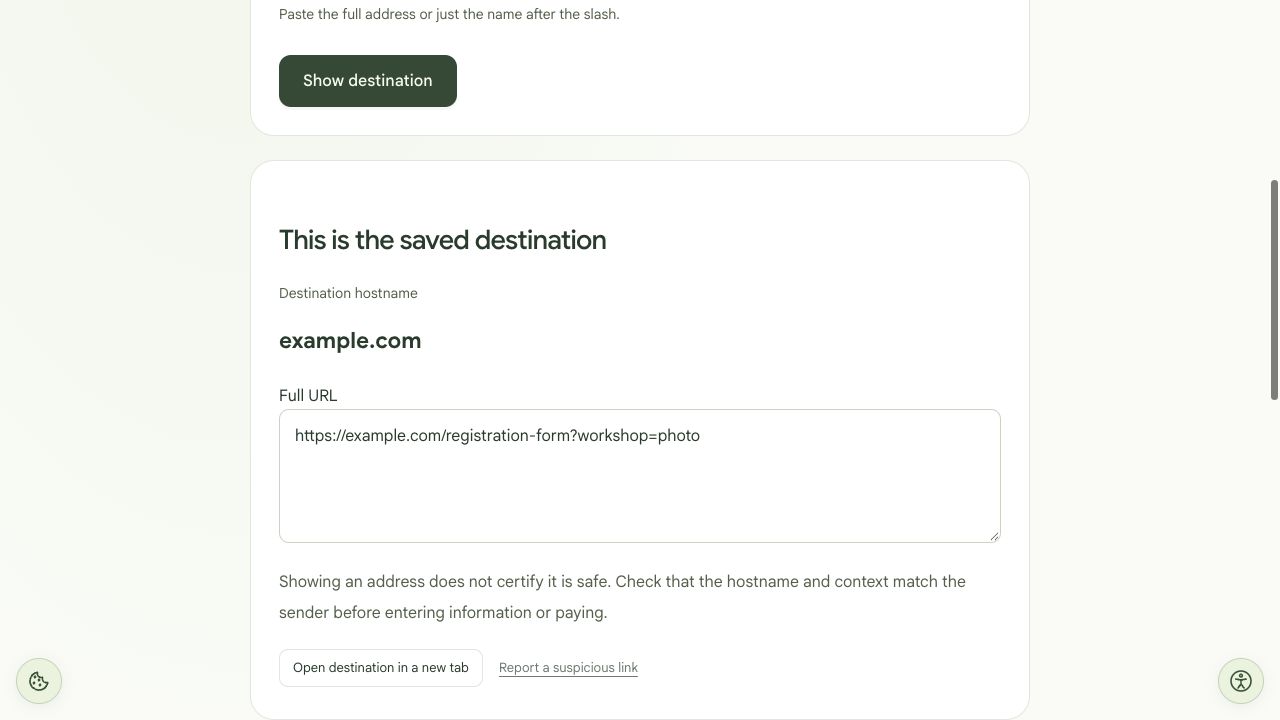
What we tested: in a local Kitzr copy, we created workshop-demo for https://example.com/registration-form?workshop=photo. The Hebrew and English preview tools returned that exact saved URL, and the short-link redirect returned it as its destination. The example is not an active form. No authorized Google Forms demo form was available, so form publishing, respondent permissions, signed-out access and response submission were not performed or verified. Test those steps on your own form before distribution.
- Publish the form in Google Forms and check who can respond. Copy the responder link from publishing or sharing controls, not the address bar of the editor.
- Open that link in a private window. If your audience needs an authorized account, also test with an appropriate respondent account. A private window alone cannot verify a specific group’s access.
- Check the form title, questions and submission confirmation. Submit an identifiable test response of your own; do not use somebody else’s details.
- Sign in to Kitzr, paste the responder URL and choose an available alias, such as workshop-signup. This is a name suggestion, not a reserved or guaranteed link.
- Copy the actual short link and open it on a phone. After the redirect, confirm it is the same form with the same access conditions.
- Record the short link, responder URL and distribution channel. Before printing a QR code, scan a sample at the planned print size and check the form again.
Diagnose the form, the short link or access
| Symptom | Next check |
|---|---|
| The address ends in /edit | Copy a responder link from sharing controls. Do not manually change suffixes or grant editing access to solve a respondent-access problem. |
| Google sign-in is requested | Check responder access and the one-response limit. Shortening cannot remove sign-in. Change a setting only if it is unnecessary for your form’s purpose. |
| The form is not accepting responses | Check publishing and response collection on the original form. A new short link will not reopen a closed form. |
| The original works but the short link does not | Preview the saved destination and check whether the link is paused in your account. Existing destinations cannot be edited; create a new short link if the wrong URL was saved. |
What the numbers can tell you
For an illustrative two-group distribution, create separate short links that both point to the same responder URL. You can compare opens for each link. Submitted responses remain in Google Forms, and Kitzr counts alone cannot assign each response to a particular short link.
Test responses, repeat opens and visits via the original URL affect the comparison. Do not describe clicks divided into responses as a precise registration rate without an additional measurement method.
Before sharing a prefilled link
Inspect the long URL itself. If it contains a name, email address or personal answer, recipients may be able to read it. A short URL or QR code does not encrypt the destination. Use a general responder link for broad distribution.
Shorten the form URL · Create a QR code · Check the saved address