
How to Track Campaigns with UTM Parameters
Short URLs and campaign tracking work together. Kitzr measures link opens; UTM parameters help analytics on the destination website identify the campaign behind a visit.
What goes in the URL?
Common parameters are utm_source for the source, utm_medium for the channel and utm_campaign for the campaign name. For example: https://example.com/?utm_source=newsletter&utm_medium=email&utm_campaign=summer. Add them to the destination URL before shortening it. The short link preserves the complete destination and its parameters.
Use consistent names
Choose lowercase English names and keep them consistent. Some analytics systems treat newsletter and Newsletter as different values. Define channel names in advance to avoid splitting reports across almost identical labels.
Create one link per channel
For an email, WhatsApp and social campaign, create three destination URLs with suitable tags and three short links. You can then compare clicks for each link even when an app does not share referral information.
Understand the limits
UTM tags do not identify a person or guarantee purchase tracking. Conversion measurement needs to be configured on the destination website. If someone shares the tagged link elsewhere, the original tags may travel with it, so attribution is not a perfect picture.
By the Kitzr team · Updated:
Worked example: one workshop, three channels
Assume registration takes place at example.com/workshop. Keep the campaign name consistent and vary source and medium to compare distribution channels. These names are a suggested convention, not a mandatory list of values.
| Placement | Source | Medium | Campaign |
|---|---|---|---|
| Mailing list | newsletter | winter_workshop | |
| Instagram profile | social | winter_workshop | |
| WhatsApp group message | messaging | winter_workshop |
From landing page to shareable link
https://example.com/workshop?utm_source=newsletter&utm_medium=email&utm_campaign=winter_workshop&utm_content=top_button- Open the UTM builder and paste the workshop address. Select a channel preset or enter source and medium yourself.
- Set the campaign to winter_workshop. To compare two buttons in an email, use content values such as top_button and footer_link.
- Build the URL and inspect it before shortening. Other parameters and the fragment are preserved; existing values for the five supported UTM fields are replaced.
- Shorten each channel version separately and record the mapping in your own plan. Opening a short link should lead to the full URL with its tags.
Check measurement, not just URL generation
Open the link once and verify that the tags reach the landing page, or that your analytics tool captures them before another redirect. A destination site can remove parameters during redirection, so generating a URL does not prove that a visit was measured.
If analytics is installed at the destination, check its relevant acquisition report for your source and medium. You need access to that report; Kitzr does not install analytics on another website. Reporting delays, privacy settings, blockers and consent choices can reduce or delay the data.
Do not put email addresses, phone numbers, personal order identifiers or passwords in tags. They are part of a public URL and may enter browser histories and server logs. Use campaign labels rather than identifiers for a person.
Avoid splitting one campaign across several names
Use consistent capitalization: Email and email may be counted separately. Do not rename a campaign just because the message copy changed; content can distinguish creative versions. Someone forwarding the same link also forwards its original tags, so the tag does not prove who shared it.
Before-and-after check: existing parameters and a fragment
Illustrative example only: a workshop page already has a language parameter, old campaign tags and a fragment pointing to registration. Paste this URL into Kitzr’s UTM builder. You do not need to visit it or publish a short link to inspect the generated result.
https://example.com/workshop?lang=he&utm_source=old&utm_medium=old&utm_campaign=old&utm_term=old#signupFill the fields and compare the output
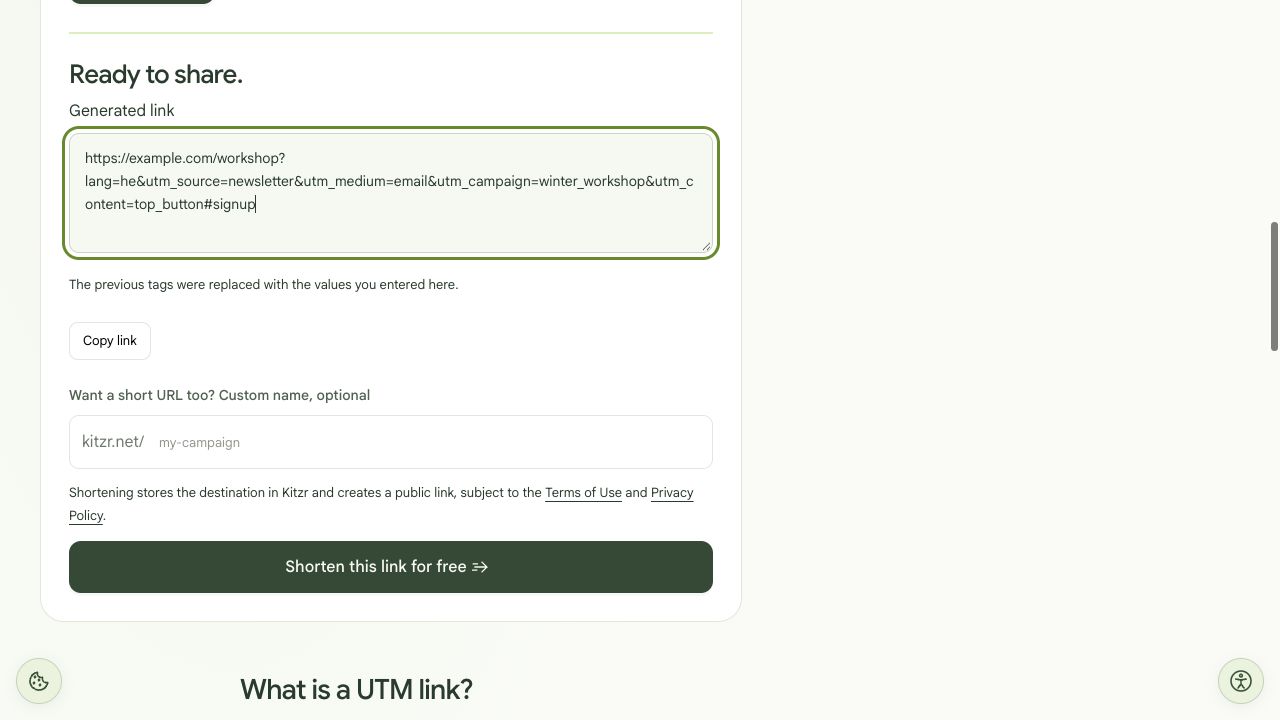
Test performed: we entered the example URL and the four values above, then compared the complete output. lang=he and #signup were preserved, source, medium and campaign were replaced, content was added, and the old term was removed. This checks URL construction only; receipt of a visit or conversion by external analytics was not tested.
https://example.com/workshop?lang=he&utm_source=newsletter&utm_medium=email&utm_campaign=winter_workshop&utm_content=top_button#signup- Enter newsletter for source, email for medium, winter_workshop for campaign and top_button for content. Leave term empty.
- Generate the URL and check that lang=he remains. The three old tags are replaced, utm_content is added and the old utm_term is removed because its field was left blank.
- Check that #signup remains at the end. Tags manually typed after # are not query parameters; add them through the corresponding fields.
- For the next placement, change source and medium according to your distribution plan. Keep the campaign name consistent instead of splitting one promotion into several names.
Prepare a distribution checklist
In your own sheet, record placement, tagged destination, the actual generated short link, check date and reviewer. Keep recipient lists and customer identifiers out of tags. Record a check as passed only after performing it.
Separate URL validation from analytics validation. This example shows how the URL is assembled; it does not prove that analytics on example.com received an event or recorded a conversion.
When Kitzr and campaign reports differ
| Difference | Practical next step |
|---|---|
| Tags disappear after redirection | Compare the original destination with the final address after its redirects. Ask the destination operator whether parameters are retained or captured before redirecting. |
| A campaign appears under several names | Compare case, hyphens and spaces. Fix future distribution links; a new link does not automatically merge data already collected. |
| Kitzr shows opens but analytics shows no visits | Check that analytics is installed on the landing page, the date range and consent. Kitzr does not install tracking or prove every open was measured by the destination. |
| The channel is unclassified | A custom value such as messaging does not guarantee a particular channel group. Inspect the raw source/medium and your analytics tool’s classification rules. |
Further reading: Google Analytics: campaign data and UTM parameters
Build the example URL · Understand differences between reports